Write actions: let Claude update Salesforce, HubSpot, Attio and more
Rig lets Claude, ChatGPT, Cursor and Rig's own workflows make changes in your business apps: log a call in Salesforce, move a HubSpot deal, add an Attio note. Every write goes through the same checks: writes switched on for the workspace, a role allowed to run that action, an optional human approval, and a line in the audit log.
What are write actions in Rig?
A write action is a named, reviewed operation that changes data in another app, such as salesforce.create-task or hubspot.update-deal. Rig holds the connection to the app, so an agent never sees the credentials. It asks Rig to run the action, and Rig decides whether this person may do that.
Writes reach Rig from two places. MCP clients: Claude (desktop, web and Claude Code), ChatGPT, Cursor and any other tool you connect to Rig over MCP. Rig workflows and data apps: a workflow step or a button in an app runs the same action with the same checks. The chat inside Rig answers questions and does not fire writes.
Salesforce writes launched in August 2026, and the wider set of apps below followed through the autumn.
Which apps can Claude write to through Rig?
These apps have built-in write actions today. Each one is a reviewed operation with its own input checks. Things left out are left out on purpose: deletes, merges, money movement and sends to customers stay with people.
| App | What agents can do | What they cannot do |
|---|---|---|
| Salesforce | Create, update and upsert records on standard and custom objects. Log tasks and calls, create meetings and notes, and post to Chatter with @mentions. | Delete, undelete or merge records, send email from Salesforce, or change users, profiles and permission sets through the record actions. |
| HubSpot | Create and update contacts, companies, deals and tickets. Add notes, create and complete tasks, log calls and meetings, and associate records. | Merge, archive or GDPR-delete records, enrol contacts in sequences or workflows, send marketing email, or change properties and pipelines. |
| Attio | Create and update records, find or create a record by a unique attribute, create lists, add records to lists, add notes, and create and update tasks. | Delete or overwrite records, post comments as a named person, or change objects, attributes and list settings. |
| Microsoft Dynamics 365 (Dataverse) | Create, update and upsert rows in standard and custom tables, or write up to 5,000 rows in one batch call. | Delete rows, or write to security, customisation and Power Pages tables. Every target table needs its own grant. |
| SQL Server and Azure SQL | Insert or upsert up to 10,000 rows per call into tables on an allow-list you set. | Delete rows, or write to any table missing from the allow-list. |
| Xero | Create and update sales invoices, create draft credit notes, create and update contacts, and add history notes. | Record payments, touch bank transactions or journals, void invoices, or email invoices to customers. |
| Notion | Create pages, update page properties, append content, add database rows and comment on pages. | Archive pages, edit or delete existing blocks, or change database schemas. |
| Chargebee | Create customers without payment details, update customer, subscription and invoice fields, and add comments. | Create or cancel subscriptions, charge, refund, issue credit notes or collect payment. |
| GitHub | Open pull requests that change allowed paths, create issues, comment on issues and pull requests, and add labels. | Merge or approve pull requests, push to branches, cut releases or change repository settings. |
| Google Ads | Pause and enable campaigns, ad groups, ads and keywords, add keywords and negatives, write ads, change bids and budgets, create campaigns and upload offline conversions. | Remove anything unless the request says so explicitly. Every action starts switched off, and budget changes and general mutations are for administrators and owners only. |
| Frontify | Find assets and set metadata on them. | Upload, replace or delete assets. |
| Slack and email | Post a message to a Slack channel, ask for an approval in Slack, or send a notification email. | Post as a named person: Slack messages come from the Rig bot. |
The app links go to each tool's setup guide. Writes are set up on the same card in Connections, in its Write section.
Can Claude write back to Salesforce?
Yes. Claude can create, update and upsert records on standard objects (accounts, contacts, leads, opportunities, cases, campaigns and more) and on your custom objects. It can log tasks and calls, create meetings and notes, and post to a record's Chatter feed with @mentions.
- Every change runs as the Run As user of your Salesforce Connected App, so that user's permission set is the ceiling. Give it Create and Edit plus field-level security on the objects agents should write to.
- Chatter posts need Feed Tracking switched on for the object, and a licence that includes Chatter.
- Upsert works by an External ID field, which makes it the right action for syncing rows from your warehouse back into Salesforce.
- Records can't be deleted, undeleted or merged. Users, profiles and permission sets are refused by the record actions.
Can Claude update HubSpot records?
Yes. Claude can create and update contacts, companies, deals and tickets, add notes, create and complete tasks, log calls and meetings, and associate records with each other. Writes go through a HubSpot sign-in you approve on Rig's Connections page, which grants the write permissions. The read-only key from the HubSpot connection guide is only used for syncing and is never used to write.
Logging a call records the activity. It does not place the call. Merges, archives, list membership, sequence enrolment and marketing email are not available.
Can Claude write to Attio through MCP?
Yes. Claude can create and update records, find or create a record by a unique attribute such as a domain, create lists, add records to lists and update their entries, add notes, and create and update tasks.
- An update sends the values Claude expects the record to hold. Rig reads the record first and refuses the change if someone else has edited it since, so an agent never overwrites a colleague's change.
- Find or create returns an existing match unchanged, which stops agents creating duplicates.
- Notes and tasks need the
note,taskanduser_managementscopes. An Attio connection made before these were added has to reconnect once.
What about apps that are not on the list?
For other tools you connect as a source, Rig can discover write actions. An administrator or owner clicks Discover write actions on the tool in Connections. Rig reads the vendor's API documentation and proposes the operations it supports, each with a risk tier.
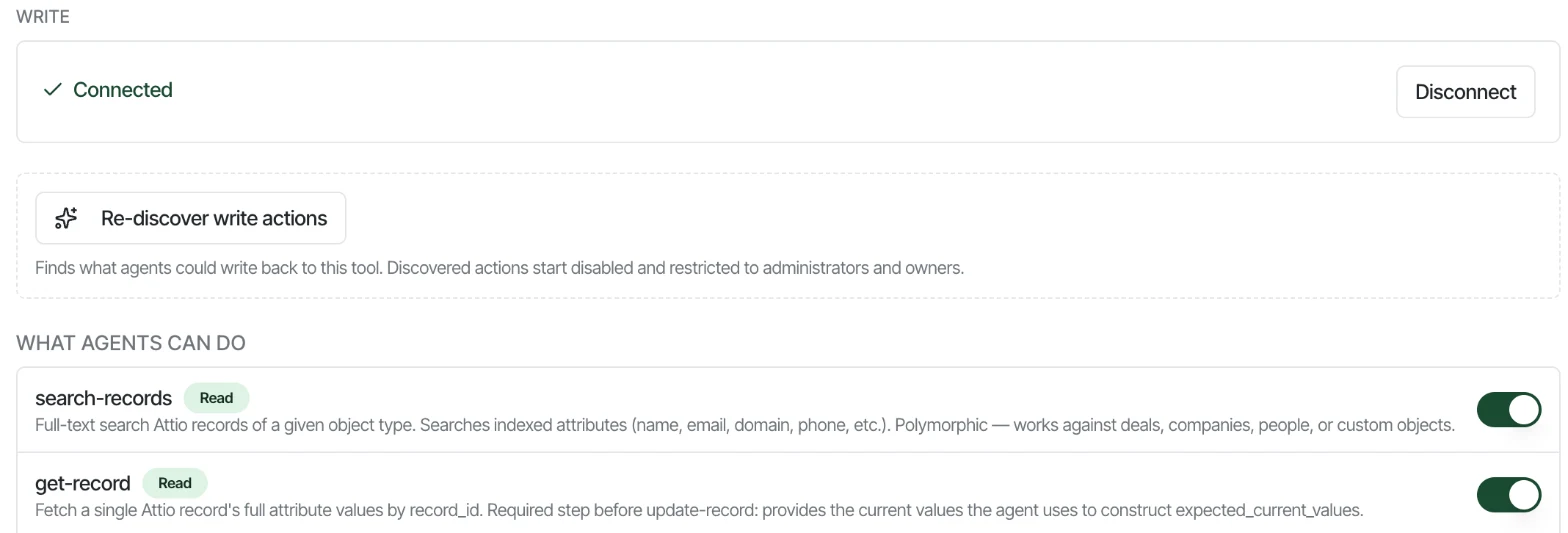
- Discovery is in early access and switched on per workspace. Ask us if you want it.
- Every discovered action starts switched off and limited to administrators and owners.
- Rig sets a minimum risk tier from what the operation does: deletes, archives and cancellations are destructive; budgets, bids, sends, publishes and orders are spend. The model may raise a tier but never lower it.
- Calls only go to the vendor's own API hosts, and the credential only travels in a header.
- A preview shows the exact request without sending it. Where the vendor has a dry-run mode Rig has verified, such as Google Ads, the preview asks the vendor to check the change too.
How does a write run, step by step?
Every MCP client follows the same three calls.
- Find the action. The agent calls list_actions. Rig returns only the actions for tools connected in your workspace, each with what it changes and the lowest role allowed to run it.
- Read its contract. The agent calls describe_action for the one it picked. Rig returns the input schema and worked examples, so the payload is right on the first try. Unknown fields are rejected.
- Run it. The agent calls execute_action. Rig checks that writes are on for the workspace, that the person asking holds the role and grants for this action, and the rate limit. Then it either sends the write to the app or holds it for approval, and records the attempt in the audit log.
This is a trimmed reply to describe_action for logging a Salesforce task:
{
  "integration": "salesforce",
  "action_type": "create-task",
  "summary": "Log a task against an account, opportunity or contact.",
  "side_effects": "write-create",
  "input_schema": {
    "required": ["subject"],
    "properties": {
      "subject":      { "type": "string" },
      "relatedToId":  { "description": "Account or opportunity id (WhatId)" },
      "contactId":    { "description": "Contact or lead id (WhoId)" },
      "status":       { "default": "Completed" },
      "dueDate":      { "description": "YYYY-MM-DD" },
      "taskSubtype":  { "enum": ["Task", "Call", "Email"] }
    }
  }
}
In practice you just ask: "Log a completed call on the Acme opportunity: they want to revisit seat count before renewal." Claude finds the opportunity, reads the contract above and runs the action.
How do I turn on write actions?
- Check writes are on for your workspace. Writes are a workspace feature, bought or on a trial. Ask us if
Access→Writesshows them as off. - Connect the app. Open
Connections, connect the tool, and complete its Write section if it asks for a write credential. - Choose what agents can do. Open the tool's card. Under What agents can do, switch each action on or off. Dynamics 365, SQL Server and Google Ads actions start off until an administrator or owner switches them on.
- Set who may fire each write. In
Access→Writes, adjust grants per role if the defaults don't fit. - Connect Claude. Follow Connect Rig to your AI tools. The write actions show up through the same MCP connection as everything else.
Who can fire a write action?
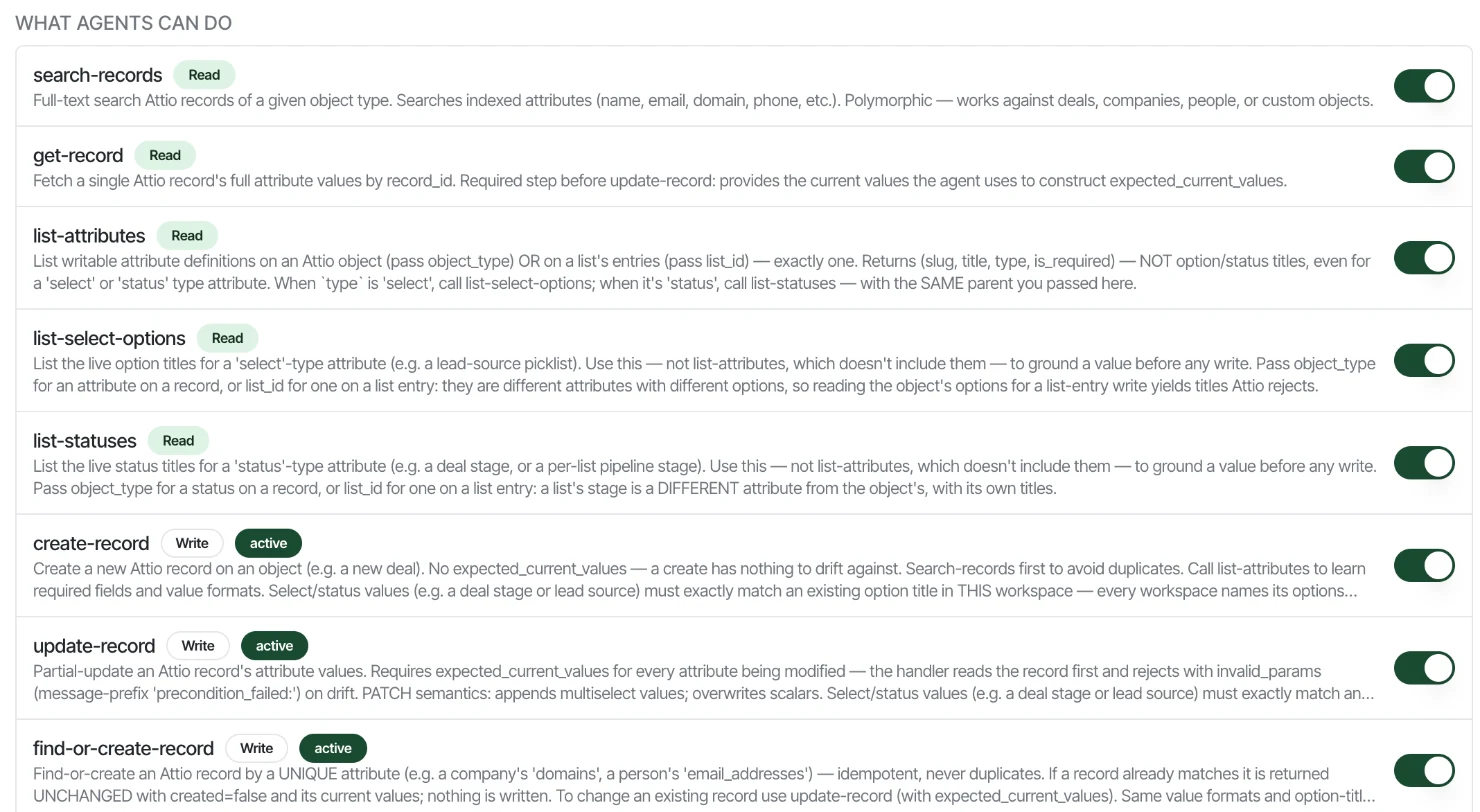
Editors and above, by default, and only within your own grants. Rig checks these in order:
- Workspace capability. If writes are off for the workspace, nothing fires. The check fails closed: if Rig can't tell, the answer is no.
- Editor floor. No write ever runs for an analyst or viewer. No grant can lower an action below editor.
- Per-tool grants. A role can be given or denied a whole tool, such as Xero.
- Per-action grants. Each action has a default floor. An allow opens it to a role and every role above it, never below editor. A deny closes it for exactly that role. Discovered actions start at administrators and owners.
- Rig staff get no shortcut. A Rig platform admin can read across workspaces for support, but a write goes through the same floor and grants under their role in your workspace.
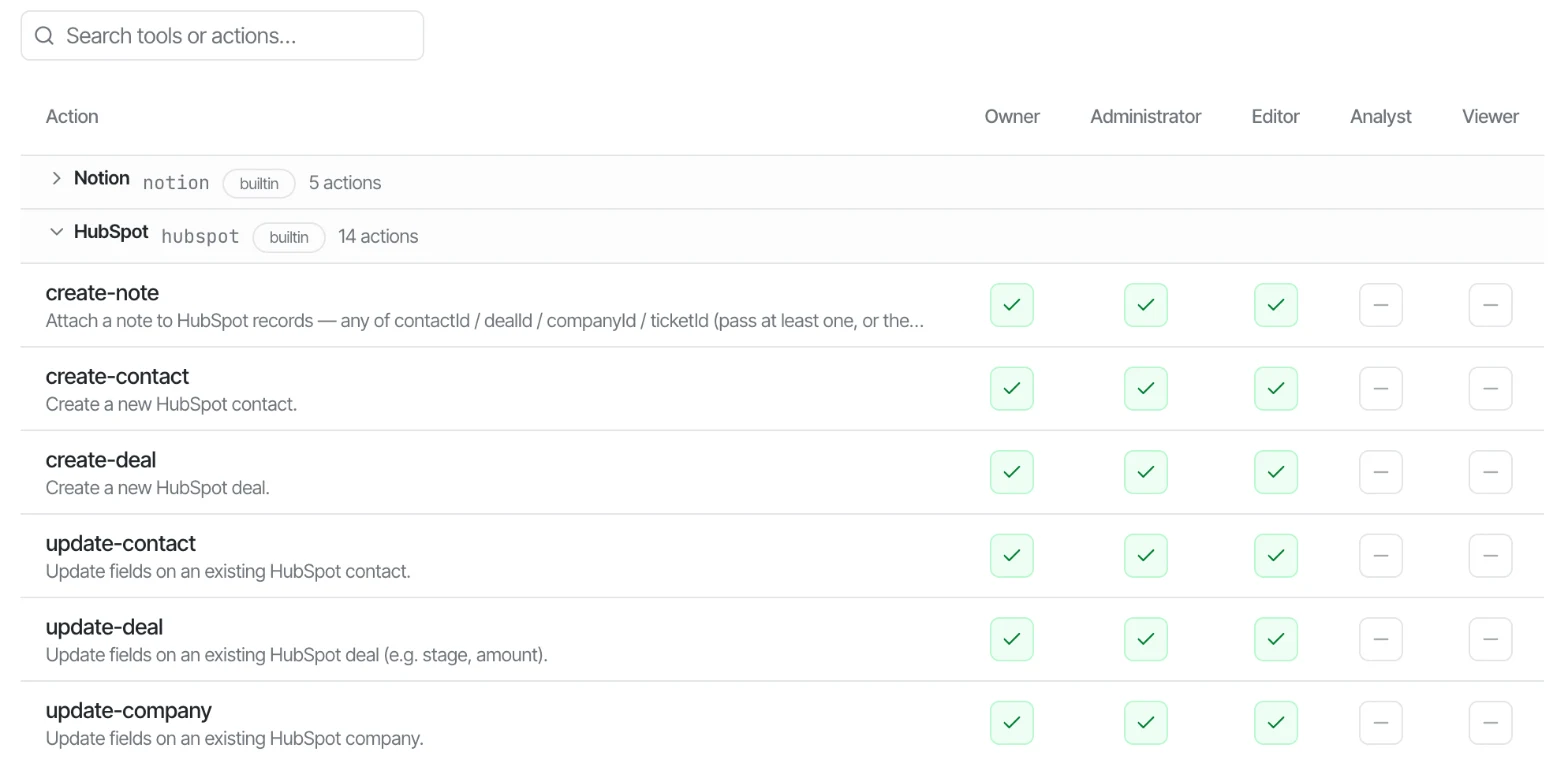
Riskier actions start higher. In Google Ads, editors can pause campaigns and add keywords, while budget changes and general mutations are for administrators and owners only.
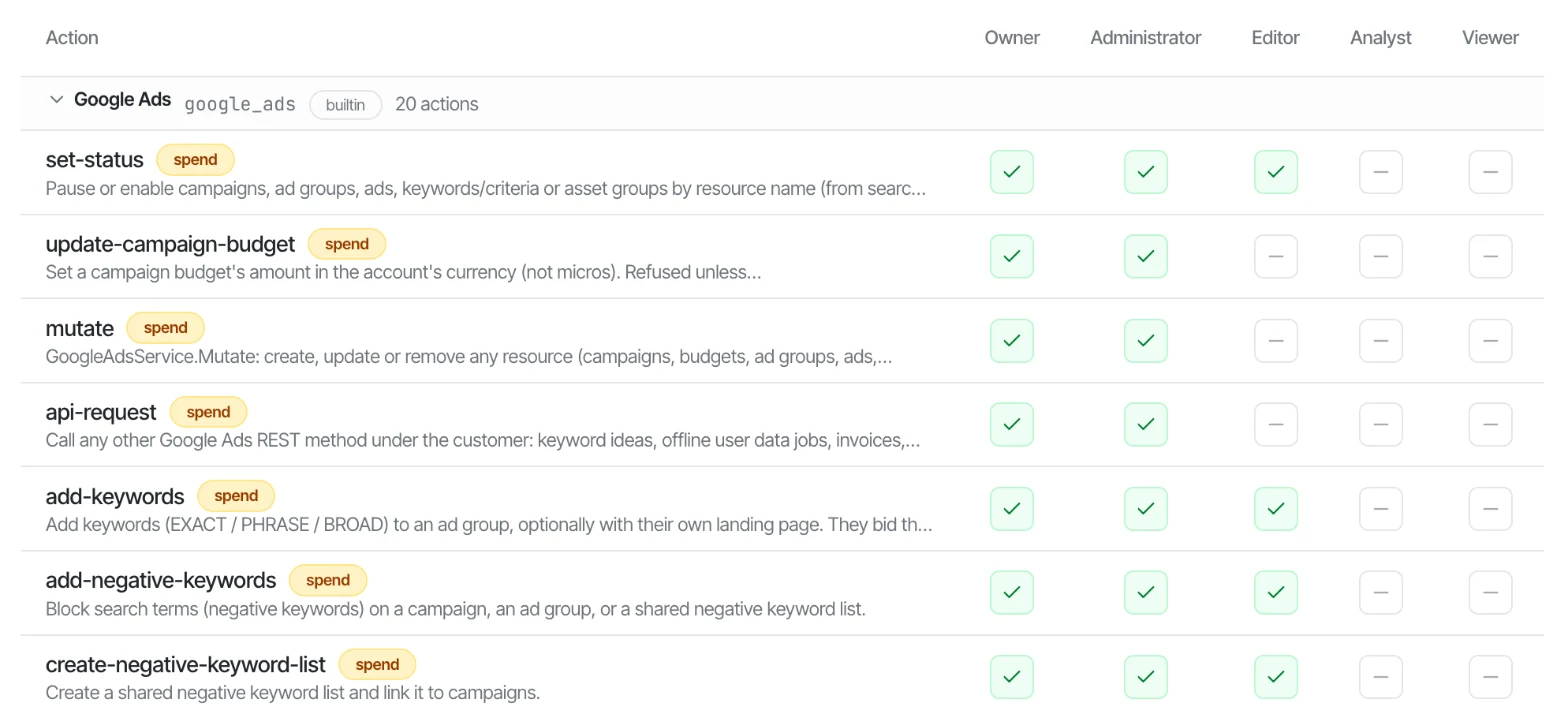
Workflows follow the same rules. A run you start is judged as you. A scheduled or webhook run is judged as the person who created the workflow, and the audit log records that it ran on their behalf. See role-based access control for how roles work across Rig.
Can a write wait for a person to approve it?
Yes. An owner picks which risk tiers wait for approval: spend (budgets, bids, sends, publishes, orders, licence seats), access (permission sets, licences, freezing or deactivating users) and destructive (deletes, voids, cancellations). It is off by default.
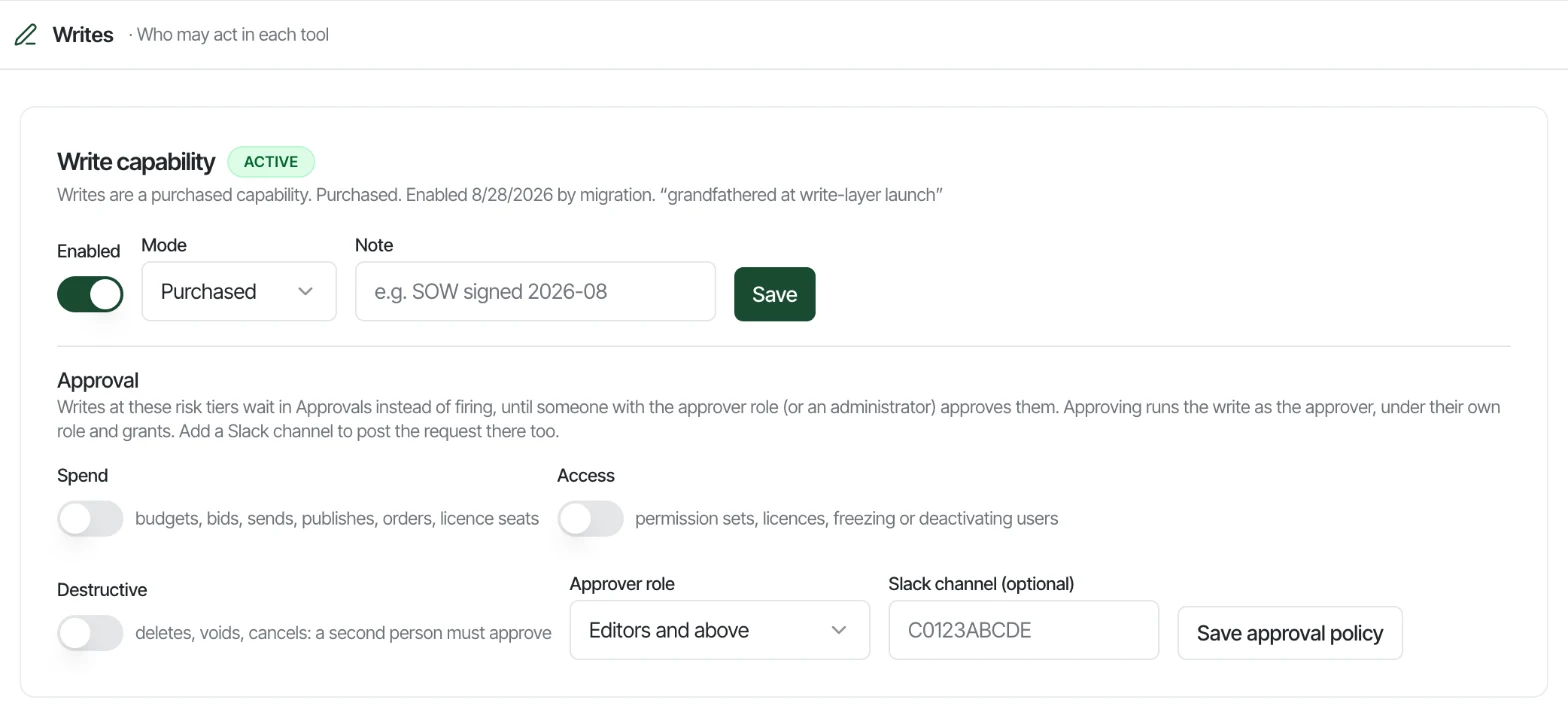
- A write in a held tier waits in Rig's Approvals inbox instead of firing. Add a Slack channel and the request is posted there too.
- The agent is told the write is waiting, and can say so to the person who asked.
- Approving runs the write as the approver, under their own role and grants. The audit log names both people.
- A destructive write needs a second person. An owner or administrator approving their own has to type the action's name to confirm.
- Previews never wait: they don't send the write.
What will Rig never do on its own?
- Delete, merge or void records through a built-in action.
- Move money: payments, refunds, charges, bank transactions and journals are not built-in actions.
- Send to your customers: emailing an invoice or enrolling a contact in a sequence stays with people.
- Change an app's schema, users or permissions through the everyday record actions.
- Call an arbitrary URL. Every outbound call is a named action pinned to the vendor's host.
- Write from a partial input. A workflow fed by a capped or cut-off data step is refused, so you never get half a sync.
When the outcome is unclear
If an app fails mid-request and Rig can't tell whether the change landed, it says so. Workflows stop on that answer instead of retrying, so a write is never sent twice by accident.
How do I see what an agent changed?
Every write action call is recorded with who asked, which action, the inputs with secrets removed, the result, and where it came from: the MCP client, or the workflow and run that fired it. If the audit log can't be written, the write is refused. Each person is also limited to 60 write attempts a minute.
In the app itself, a change shows as made by the connection's user, such as your Salesforce integration user. Rig's log is where you find the person behind it.
Frequently asked questions
- Can Claude update Salesforce records through Rig?
- Yes. Once Salesforce is connected and writes are on, Claude can create, update and upsert records, log tasks and calls, create meetings and notes, and post to Chatter. Every change runs as your Salesforce integration user, so its permission set is the ceiling.
- Can Claude update a HubSpot record?
- Yes. Claude can create and update contacts, companies, deals and tickets, and add notes, tasks, logged calls and meetings, through a HubSpot sign-in you approve on Rig's Connections page. That sign-in grants the write permissions. The read-only key used for syncing is never used to write.
- Can Claude write to Attio over MCP?
- Yes. Claude can create and update records, find or create a record by a unique attribute, manage list entries, and add notes and tasks. Updates send the values Claude expects to find, and Rig refuses the change if the record has moved on since.
- Does each person need their own API key for every app?
- No. Your workspace connects each app to Rig once. People connect Claude, ChatGPT or Cursor to Rig over MCP, and Rig decides per request whether that person may run the action.
- Can an agent delete records or move money?
- The built-in actions never delete, merge, void, move money or send to customers. A discovered action that would is tagged destructive or spend, starts switched off, and only an administrator or owner can switch it on. Your approval policy can then hold it until a person approves.
- Who can run a write action?
- Editors and above, by default. Administrators can open or close individual actions per role in Access, but no grant takes a write below editor. Analysts and viewers can never write.
- What about apps that are not on the list?
- For any tool connected as a source, Rig can read the vendor's API documentation and propose the write operations it supports. This is in early access, switched on per workspace. Each discovered action starts off and is limited to administrators and owners.