At a glance
- Rig agrees a fixed delivery price after scoping the data, logic and integrations.
- Data moves in checked waves, with a parallel run where the systems allow it.
- History and permission tests are part of acceptance.
- Your system owners approve the mappings and the cutover.
Records, logic and owners
Source to target definitions
Counts, totals and access
Sign-off and rollback plan
Map the data and the logic it carries
The table is a starting inventory, and the target edition, customisations and API access decide the final mapping. Check each object even when the name matches, because an object with the same name can behave differently in the target.
| Source | Target or retained output | Checks and known traps |
|---|---|---|
| Account | Organizations | Match on domain, and keep the Salesforce account ID as a field for repeatable updates. |
| Contact and Lead | People | Match on email address. Decide whether leads become people on a list or stay in the archive. |
| Opportunity | Opportunities on a deal list | Map stages to list statuses, and keep amounts and close dates as list fields. |
| Task, Event and notes | Notes, or a warehouse archive | Agree which activity history users need in Affinity and which stays queryable in the warehouse. |
| Custom objects and record types | Lists and fields | Each custom object needs a design decision, because Affinity organises work in lists rather than objects. |
Preserve the deal process as well as the records
Private capital teams usually run deal flow, portfolio monitoring and fundraising as separate processes, and Affinity organises each one as a list with its own statuses and fields. Rig maps each Salesforce process to an Affinity list, agrees the stage translation with the people who use it, and keeps the original Salesforce values next to the new ones.
How a migration runs in Rig
Rig maps the systems and data across your estate, connects the source and target, and maps one schema to the other with previews of real records. Rig engineers agree the objects and history in scope with your team, prepare the destination and rehearse the load before they reconcile the results. Sign-off, cutover and follow-up tasks sit in the same migration workspace.
Agree a timeline against the actual scope
The table gives a planning allowance for each phase, and the assessment turns it into a dated plan for the whole project. Large estates need several waves, and application configuration can add time.
| Phase | Initial planning allowance | Exit check |
|---|---|---|
| Assessment | 3 to 5 working days | Owners, access and inventory agreed |
| Sample and mapping | 5 to 10 working days | Sample records and exceptions reviewed |
| Build and parallel validation | 2 to 6 weeks per wave | Counts, totals and permissions accepted |
| Final sync and cutover | 1 to 3 working days per wave | Business owner signs off; rollback remains available |
Keep the evidence for each migration wave
For each wave you receive the source-to-target mappings, a reconciliation report, an exception log and a cutover checklist. The checks cover duplicates, missing relationships, deleted records, time zones and permissions as well as headline totals, and the old system stays available until the agreed retention and rollback checks pass.
Where Rig may fall short
A migration that only needs a supported CSV import may be simpler to do yourself. Sub-minute operational replication, a full ERP implementation and specialist application redesign need a separate scope or another provider. Where Rig Ingest moves the data, confirm connector coverage for each source before you commit.
Check the import method before the full move
Affinity publishes a help article on exporting data from Salesforce for import into Affinity, and an API for loading notes and list entries. Export a sample that includes several opportunity stages, contacts linked to more than one account and activity history, load it into a test list, and agree an archive for anything Affinity cannot reproduce.
Inside Rig Migrate
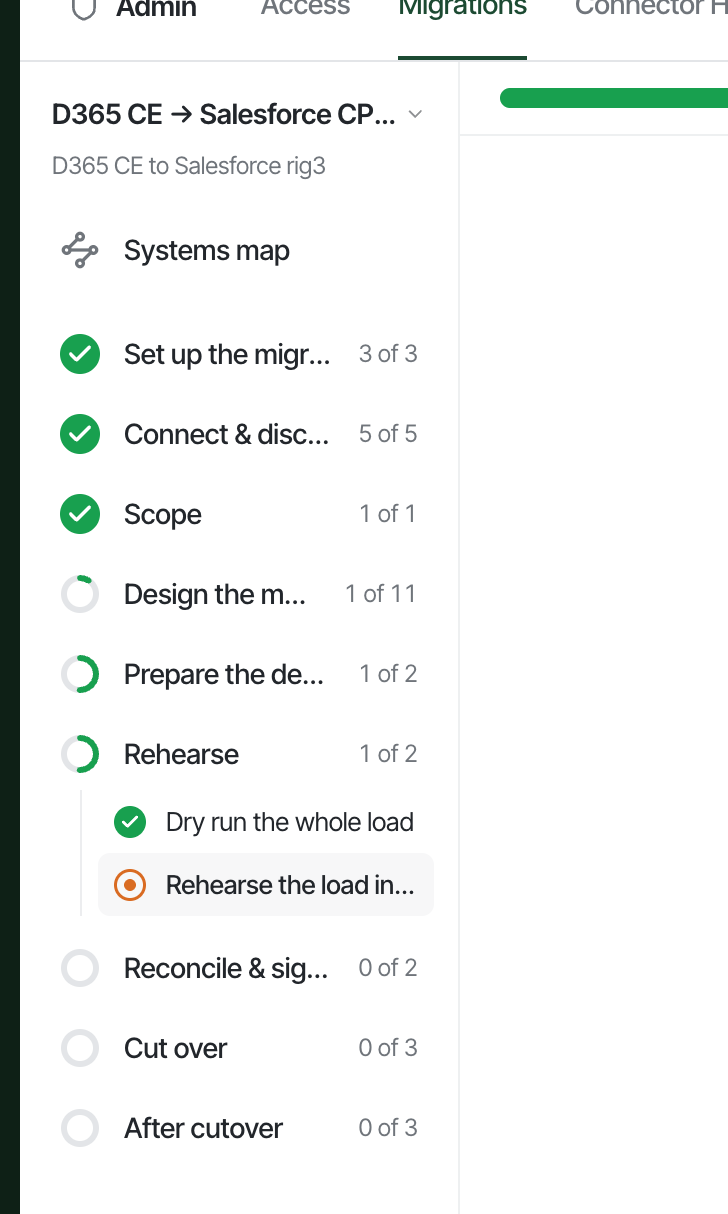
Run the migration in Rig, from the systems map to cutover
Rig natively maps systems and data across your IT estate, connects source and target systems, scopes the move and maps one schema to another. The same migration workspace tracks destination preparation, rehearsals, reconciliation, sign-off and the work after cutover, so your team can review the decisions and progress in one place.
Map the IT estate
Map systems, data and integration flows across the IT estate. See which reports, processes and teams depend on the systems you plan to change.
Set up the migration
Create the migration in Rig and record the source, destination and work to deliver. Keep the migration tasks and progress together.
Connect and discover
Connect the source and target systems, then inspect their schemas and available data. Confirm access before deciding how each object will move.
Scope the work
Choose the objects, fields and history to migrate. Record what stays, what changes and the dependencies the migration needs to preserve.
Map schema to schema
Map source objects and fields to the target schema. Preview records and review rules to copy, translate, calculate, link, look up and match owners.
Prepare the destination
Track the target preparation needed before loading data, including its configuration and the relationships your mapped records will use.
Rehearse the load
Dry run the whole load and rehearse it in the destination environment. Review the results and resolve issues before the production cutover.
Reconcile and sign off
Compare source and target records, relationships and business totals. Review exceptions with the system owners and record acceptance before proceeding.
Cut over
Work through the agreed cutover tasks in Rig. Coordinate the final load and user switch with the people who own the systems.
Check after cutover
Track the checks after the switch, confirm that reporting and processes work, and resolve outstanding issues before retiring the old setup.
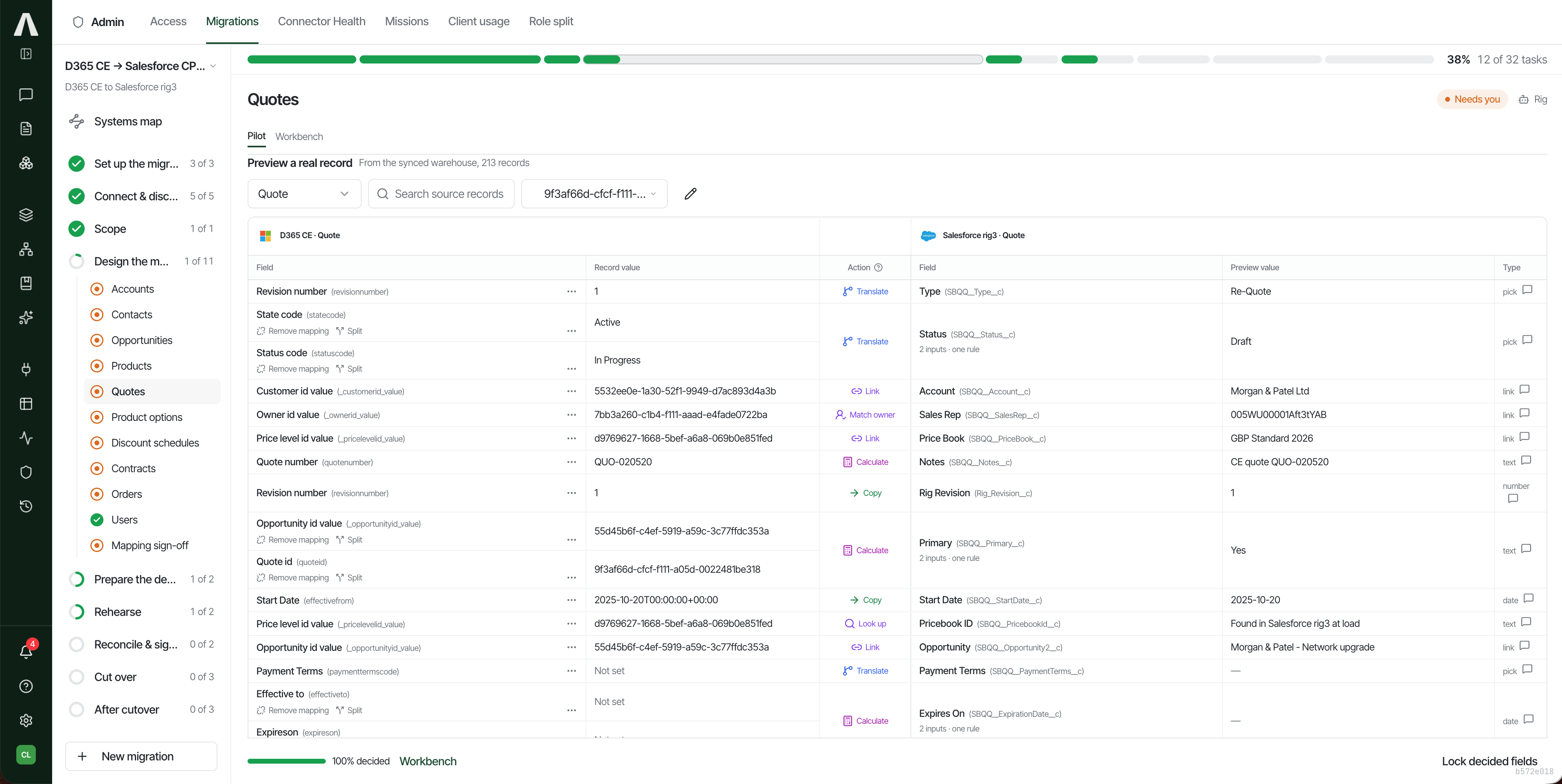
Inspect source values and target previews
The migration workbench shows source fields, target previews and the rule for each mapping. Your team can review translated values, linked records and calculated fields before signing off the mapping and rehearsing the load.
Common questions
How do I migrate from Salesforce to Affinity CRM?
Start by mapping each Salesforce process, such as deal flow or fundraising, to an Affinity list with its own statuses and fields. Rig loads organizations and people first, then opportunities and notes, and checks each wave against Salesforce counts and a sample of records. The Salesforce history that Affinity does not need stays queryable in your warehouse.
Is Affinity a good CRM for private equity firms?
Affinity describes itself as the AI-first CRM for private capital, so private equity and venture teams are its stated market. Whether it suits your firm depends on your deal process, the data you track and the systems it must connect to. Rig can map that process before you commit, and can sync Affinity into your warehouse after the move.
How much does a migration cost?
Rig maps the work and agrees a fixed delivery price before the migration starts. Source access, custom logic, the amount of history and the number of integrations affect the scope. Licences for the new CRM or ERP, and any vendor implementation fees, are agreed separately with that vendor, and Rig does not resell them.
Can we keep reporting history?
Yes, where the source lets you extract it. You decide which history the new system needs and which stays in a governed archive in your warehouse. Rig reconciles both against the original records, so reports that compare this year with earlier years keep working after the old system is switched off.
How do you check that the data matches?
Rig compares record counts, identifiers, relationships and business totals for each wave, such as balances by period or open deals by stage. Every exception goes in a log with an owner, and the business owner has to accept the results before cutover, while the old system stays available for rollback.
Sources and product details
Vendor information checked on 24 November 2026. Confirm current editions, licence terms and prices with the vendor before buying.