
At a glance
- Migrate CRM, BI, warehouse and ERP data workstreams.
- Retain mappings, definitions and reconciliation evidence.
- Application configuration and third-party licences are scoped separately.
Records, logic and owners
Source to target definitions
Counts, totals and access
Sign-off and rollback plan
Choose data migration tools around the work
A supported bulk import can suit a small one-off move. API pipelines support repeatable loads and final changes. A warehouse can hold history and make source-to-target reconciliation repeatable. Database replication tools suit different latency needs. Rig chooses the method with your team, rather than forcing every migration through one connector.
Agree the scope before delivery
The assessment records systems, volumes, owners, interfaces and reporting dependencies. Your proposal names the deliverables, excluded work, platform charges and business acceptance criteria. Rig engineers do the mapping and build with your system owners, using repeatable checks to reduce manual comparison work.
Supported migration workstreams
Choose a workstream to inspect its mapping and known traps. Source access, target readiness and specialist application requirements are confirmed in discovery.
| Workstream | Sources | Targets and outputs |
|---|---|---|
| CRM | Salesforce, HubSpot, Attio | Mapped customer records and relationships |
| BI | Power BI, Tableau, Looker, Qlik, MicroStrategy, SSRS | Your chosen BI tool and governed models |
| Pipelines | Fivetran, Airbyte | Rig Ingest where source coverage fits |
| ERP data | NetSuite, D365 F&O, GP; SAP BW assessment | Target ERP data workstream or warehouse history |
| Warehouse | Fabric workloads | Snowflake models and retained BI |
Connect, scope and run the migration in Rig
Rig natively maps systems and data across the IT estate, connects source and target systems and supports schema-to-schema mapping with record previews. Scope the objects and history, prepare the destination, then rehearse the load and reconcile the results. Track sign-off, cutover and follow-up tasks in the same migration workspace.
Agree a timeline against the actual scope
These are planning allowances for individual phases, not a promise for the whole project. Large estates need repeated waves, and application configuration can add time.
| Phase | Initial planning allowance | Exit check |
|---|---|---|
| Assessment | 3 to 5 working days | Owners, access and inventory agreed |
| Sample and mapping | 5 to 10 working days | Sample records and exceptions reviewed |
| Build and parallel validation | 2 to 6 weeks per wave | Counts, totals and permissions accepted |
| Final sync and cutover | 1 to 3 working days per wave | Business owner signs off; rollback remains available |
Keep the evidence for each migration wave
You receive the source-to-target mappings, a reconciliation report, an exception log and a cutover checklist. Test duplicates, missing relationships, deleted records, time zones and permissions as well as headline totals. Keep the old system available until the agreed retention and rollback checks pass.
Inside Rig Migrate
Run the migration in Rig, from the systems map to cutover
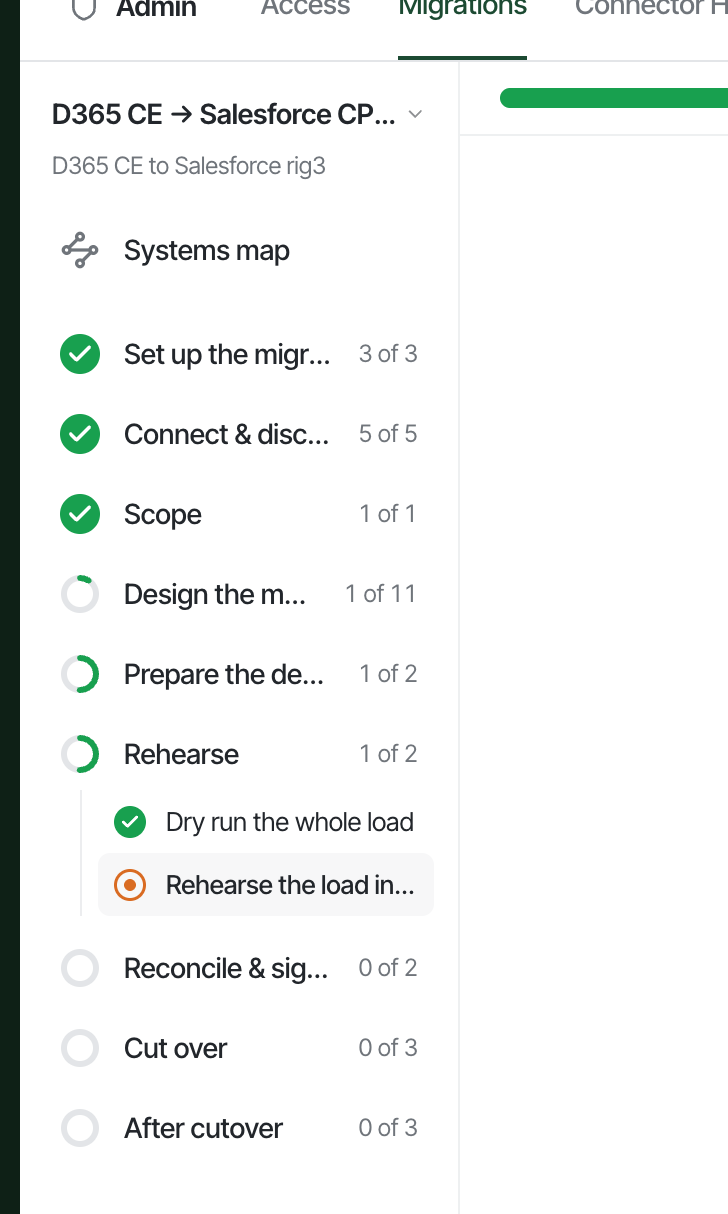
Rig natively maps systems and data across your IT estate, connects source and target systems, scopes the move and maps one schema to another. The same migration workspace tracks destination preparation, rehearsals, reconciliation, sign-off and the work after cutover, so your team can review the decisions and progress in one place.
Map the IT estate
Map systems, data and integration flows across the IT estate. See which reports, processes and teams depend on the systems you plan to change.
Set up the migration
Create the migration in Rig and record the source, destination and work to deliver. Keep the migration tasks and progress together.
Connect and discover
Connect the source and target systems, then inspect their schemas and available data. Confirm access before deciding how each object will move.
Scope the work
Choose the objects, fields and history to migrate. Record what stays, what changes and the dependencies the migration needs to preserve.
Map schema to schema
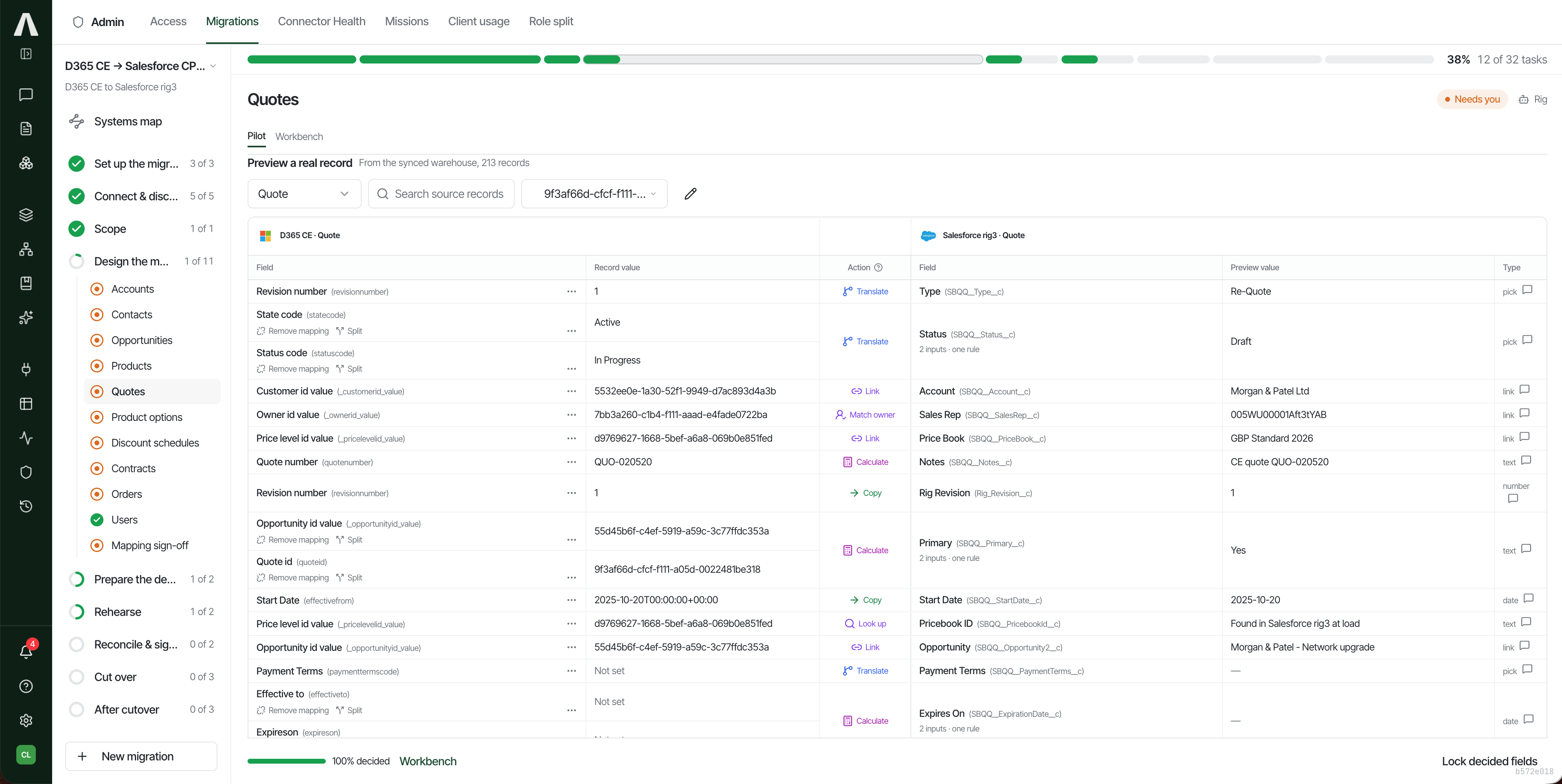
Map source objects and fields to the target schema. Preview records and review rules to copy, translate, calculate, link, look up and match owners.
Prepare the destination
Track the target preparation needed before loading data, including its configuration and the relationships your mapped records will use.
Rehearse the load
Dry run the whole load and rehearse it in the destination environment. Review the results and resolve issues before the production cutover.
Reconcile and sign off
Compare source and target records, relationships and business totals. Review exceptions with the system owners and record acceptance before proceeding.
Cut over
Work through the agreed cutover tasks in Rig. Coordinate the final load and user switch with the people who own the systems.
Check after cutover
Track the checks after the switch, confirm that reporting and processes work, and resolve outstanding issues before retiring the old setup.
Inspect source values and target previews
The migration workbench shows source fields, target previews and the rule for each mapping. Your team can review translated values, linked records and calculated fields before signing off the mapping and rehearsing the load.
Reporting migration at Birdie
Birdie reports rebuilding sales and marketing reporting in less than a day. Its team kept Snowflake and the existing Fivetran pipelines; retirement of the Looker licence is not confirmed.
Read the migration case study
Common questions
How much does a migration cost?
Rig maps the work and agrees a fixed delivery price before the migration starts. Source access, custom logic, history and the number of integrations affect the scope. Platform and third-party licence costs are agreed separately.
Can we keep reporting history?
Yes, where the source permits extraction. Agree which history belongs in the target system and which stays in a governed archive. Reconcile both against the original records.
How do you check that the data matches?
Compare record counts, identifiers, relationships and business totals for each wave. Record exceptions and require the business owner to accept the results before cutover.
Will both systems run during the move?
Plan a parallel run where the systems and licences allow it. Agree the source of truth, final changes, rollback conditions and the point at which users switch.
Who does the implementation?
Rig engineers work with your system owners. Your team approves mappings, permissions and acceptance checks. Application configuration and specialist ERP or CPQ work must be included in scope or assigned to your application partner.
Is there a guaranteed completion date?
The assessment produces a dated plan. The planning ranges on this page are estimates, subject to access, data quality, target readiness and user acceptance.
Sources and product details
Vendor information checked on 11 November 2026. Confirm current editions, licence terms and prices with the vendor before buying.